
Tutorial: Getting Started with Kubb
Learn Kubb basics by generating TypeScript types from an OpenAPI specification.
What You'll Build
A type generator that creates TypeScript types from a petStore.yaml OpenAPI specification file.
NOTE
Complete the Installation and Configuration guides before starting this tutorial.
Step 1: Set Up Your Project Structure
Create the following folder structure:
.
├── src
├── petStore.yaml
├── kubb.config.ts
└── package.json
You'll need an OpenAPI specification file. You can:
- Use your own OpenAPI/Swagger spec
- Download a sample: petStore.yaml
- Create a simple one (see example below)
Simple petStore.yaml example
openapi: 3.0.0
info:
  title: Pet Store API
  version: 1.0.0
paths:
  /pets:
    get:
      operationId: listPets
      responses:
        '200':
          description: List of pets
          content:
            application/json:
              schema:
                type: array
                items:
                  $ref: '#/components/schemas/Pet'
components:
  schemas:
    Pet:
      type: object
      required:
        - id
        - name
      properties:
        id:
          type: integer
          format: int64
        name:
          type: string
        tag:
          type: string
Step 2: Configure Kubb
Create a kubb.config.ts file and add the @kubb/plugin-oas and @kubb/plugin-ts plugins.
Set generators to an empty array for the @kubb/plugin-oas plugin since you only need TypeScript type generation.
For the @kubb/plugin-ts plugin, set output to the models folder.
import { defineConfig } from '@kubb/core'
import { pluginOas } from '@kubb/plugin-oas'
import { pluginTs } from '@kubb/plugin-ts'

export default defineConfig(() => {
  return {
    root: '.',
    input: {
      path: './petStore.yaml',
    },
    output: {
      path: './src',
    },
    plugins: [
      pluginOas(
        {
          generators: [],
          validate: true,
        },
      ),
      pluginTs(
        {
          output: {
            path: 'models',
          },
        },
      ),
    ],
  }
})
Step 3: Install Dependencies
Update your package.json with the required Kubb packages:
{
  "name": "kubb-getting-started",
  "scripts": {
    "generate": "kubb generate"
  },
  "dependencies": {
    "@kubb/cli": "latest",
    "@kubb/core": "latest",
    "@kubb/plugin-oas": "latest",
    "@kubb/plugin-ts": "latest"
  },
  "devDependencies": {
    "typescript": "^5.9.0"
  }
}
Then install the dependencies:
bun installpnpm installnpm installyarn installStep 4: Run the Generator
Execute the generator:
bun run generatepnpm run generatenpm run generateyarn run generateStep 5: Check the Output
Kubb generates your files in the following structure:
.
├── src/
│   ├── index.ts
│   └── models/
│       ├── Category.ts
│       ├── Pet.ts
│       ├── User.ts
│       └── index.ts
├── petStore.yaml
├── kubb.config.ts
└── package.json
Example of a generated type file (src/models/Pet.ts):
/**
 * Generated by Kubb (https://kubb.dev/).
 * Do not edit manually.
 */

export type Pet = {
  /**
   * @type integer, int64
   */
  id: number
  /**
   * @type string
   */
  name: string
  /**
   * @type string | undefined
   */
  tag?: string
}
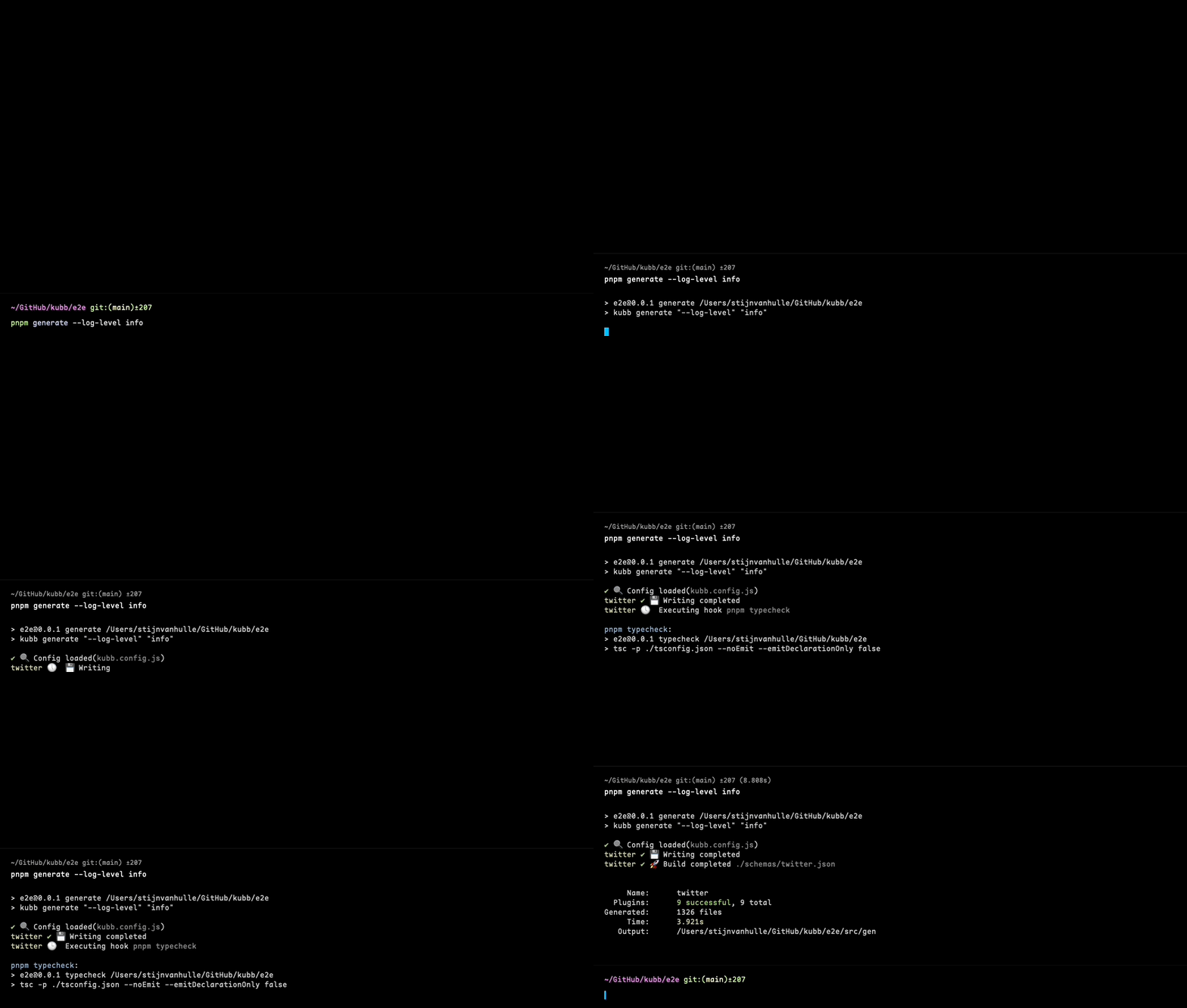
Generation process:
Understanding the Configuration
pluginOas() - Parses your OpenAPI specification:
generators- Set to[]to skip JSON schema generationvalidate- Validates the OpenAPI spec
pluginTs() - Generates TypeScript types:
output.path- Where to save generated types (e.g.,models)
input.path - Location of your OpenAPI spec file
output.path - Base output directory for all generated files
Next Steps
- Quick Start Guide - Explore more plugins and features
- Plugin TS Documentation - Advanced TypeScript generation options
- Configuration Reference - Complete configuration options